Import Excel file to DataSet in C# or VB.NET! Learn how to do it and save valuable time with EasyXLS!
http://www.easyxls.com/manual/basics/import-excel-to-dataset.html
 EasyXLS is an Excel component that can be used to export Excel files programmatically. It also permits the export of large amount of data to Excel file.
EasyXLS is an optimal solution to:
- export large volume of data from MS SQL, MySQL, MS Access, Oracle database
- export large GridView to Excel
- export large DataSet to Excel
- export large DataTable to Excel
- export large ResultSet to Excel
The Excel component supports all MS Excel file formats: XLSX, XLS, XLSM, XLSB and XML Spreadsheet. The below links explains with source code samples how to export data to these file formats:
- How to export data to XLSX file format?
- How to export data to XLS file format?
- How to export data to XLSM file format?
- How to export data to XLSB file format?
However, the recommended file format for large Excel files is the binary format like XLSB or XLS formats. Binary files are faster by default.
For a fast export and better memory management, some steps must be followed. Check the below link for more technical details:
How to export large Excel file?
The Excel component can be used from C#, VB.NET, C++.NET, PHP, ASP classic, C++, Java, VBS, VB6 or ColdFusion.
Export DataGrid to Excel file in C# and VB.NET quick and effortless!
http://www.easyxls.com/manual/FAQ/export-datagrid-to-excel.html
 EasyXLS is an Excel component that can be included in any C#, VB.NET or Java application.
Furthermore, it includes a .NET built DLL which is a COM+ library, that can be used from PHP, ASP classic, C++, VB6 or any other language that supports COM technology.
By including EasyXLS into your application, you can export Excel files that include macros or VBA code. The component supports XLSM file format, but, it also supports the older XLS format or the XLSB binary format.
EasyXLS preserves macros when the Excel file is loaded through the component. After working with loaded data or adding more data, the Excel file can be exported as XLSM file format or XLS, XLSB file.
For more technical details, read further how to export data to XLSM file.
EasyXLS can be used from any of the following environment and even more:
.NET version
- ASP.NET web pages
- Windows applications
- Windows Forms (WinForms)
- Console applications
- Windows service applications
- ASP.NET MVC web applications
COM+ version
- PHP web applications
- ASP classic web pages
- C++ applications
- MFC applications
- VB6 applications
- VBS scripts
Java version
- Java applications
- Java servlets
- ColdFusion web applications
 EasyXLS is an Excel library that it used to create Excel files, format data in cells using predefined formats or user-defined formats.
The Excel file can be created without MS Excel installed and without Office Interop.
The library has three versions:
- Excel library for .NET – can be used from C#, VB.NET, C++.NET and J#
- Excel component for languages that support COM technology – can be used from PHP, ASP classic, C++, VBS, VB6 and other
- Excel library for Java – can be used from Java or Java based programming languages like ColdFusion
EasyXLS version for .NET lets you create Excel file from ASP.NET, WinForms or console applications.
EasyXLS version for Java lets you create Excel file from servlets, JSF and any Java application.
The library permits the creation of Excel files in XLSX, XLS, XLSM and XLSB file formats for Microsoft Excel 97, 2003, 2007, 2010 and 2013. The Excel workbook can have multiple sheets.
For source code samples in any of the mentioned programming languages and more technical details, check this link about how to create Excel files. You may also find samples about how to create Excel file from basic data structures like lists, DataTable, DataSet, GridView, DataGridView or ResultSet.
 EasyXLS is an Excel component that facilitates the export of real XLS files from C#, VB.NET, Java, C++, PHP or ASP classic.
It is a common practice to save HTML files with XLS extension to export reports as Excel. But sometimes you need real XLS binary files for having access to full Excel feature, not only cell data and cell formatting. If your Excel file must include autofilters, pivot tables, conditional formatting, macros or charts, EasyXLS Excel component is the best solution and offers all of these features and even more. Your Excel file can also have multiple sheets.
Using EasyXLS, you can export a GridView, DataGridView, DataGrid, DataTable, DataSet, JTable or ResultSet data structures to Excel with one single line of code.
The exported data can be arranged in predefined or custom formats and if necessary, the data can be protected from unintentional editing actions or secured with passwords.
Furthermore, EasyXLS component handles very well big volume of data. Large Excel files can be exported with less memory consumption and at a reasonable speed.
EasyXLS also includes a calculation engine, that allows not only to add formulas to your Excel, but also to calculate them, if necessary.
Read more details on how to export data to xls file in C#, VB.NET, Java, C++, PHP.
Nice formatted reports
EasyXLS can be used to create nice formatted Excel reports. The exported reports can be in XLSX, XLS, XLSM or XLSB file format.
EasyXLS Excel library can be integrated in various programming languages like C#, VB.NET, C++.NET, Java, PHP, ASP classic or C++ or more. The library can be included in any environment that supports .NET, Java or COM technology.
Predefined formats
The report can have a predefined look or a custom formatting. EasyXLS comes with 50 predefined auto formats. Also, custom color and font schemes can be set for report appearance. Themes of colors can be applied for Office 2007-2013 documents.
Data protection
The data in cells can be protected from unintended editing, if data must keep its integrity. Excel file can also be protected with password when the file is opened or modified. EasyXLS also support encrypted Excel files.
Full support
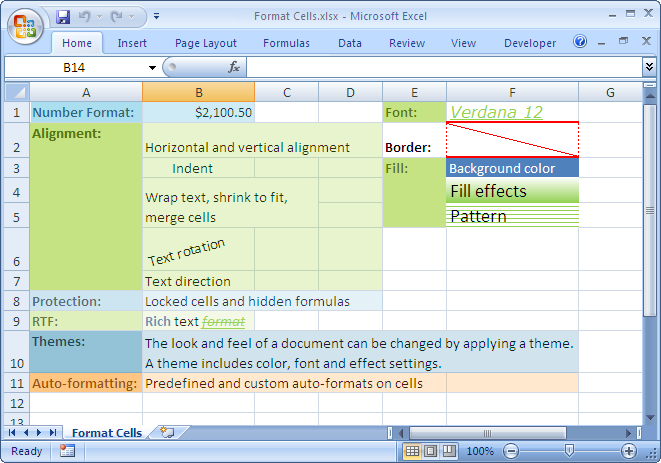
EasyXLS supports all formatting settings that Microsoft Excel offers for spreadsheet design like number and date format, text alignment, font settings, border settings, fill settings (background, pattern gradient) and cell protection.
Read more about how to format Excel cells, Excel rows or Excel columns. Code samples and more technical details can be found at this link.